
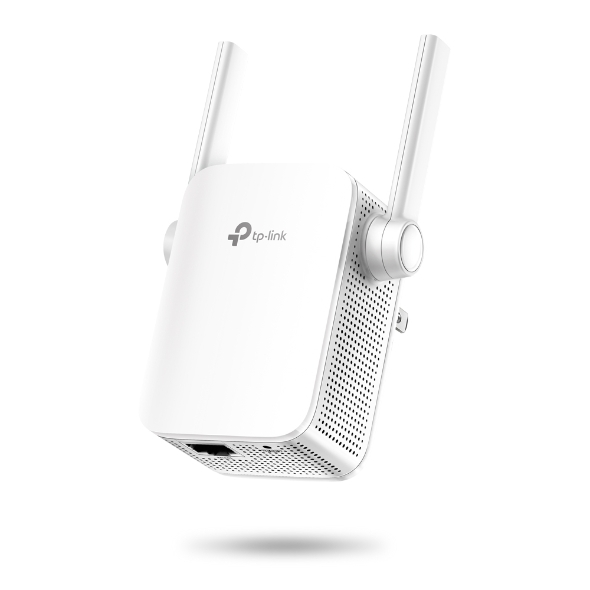



TP-Link Wireless Range Extender 300Mbps (WA855RE)
TL-WA855RE
300Mbps Wi-Fi Range Extender
Extend the reach of your existing home Wi-Fi with the TP-Link TL-WA855RE. The compact wall-plug range extender delivers theoretical wireless speeds of up to 300 Mbps on 2.4 GHz and uses two adjustable external antennas with MIMO technology to help provide a more stable wireless connection in areas your router struggles to reach. An intelligent signal indicator helps identify a suitable placement, while the built-in Ethernet port allows wired connectivity and enables Access Point Mode.
 TL-WA855RE · N300
 10/100 ETHERNET · RESET
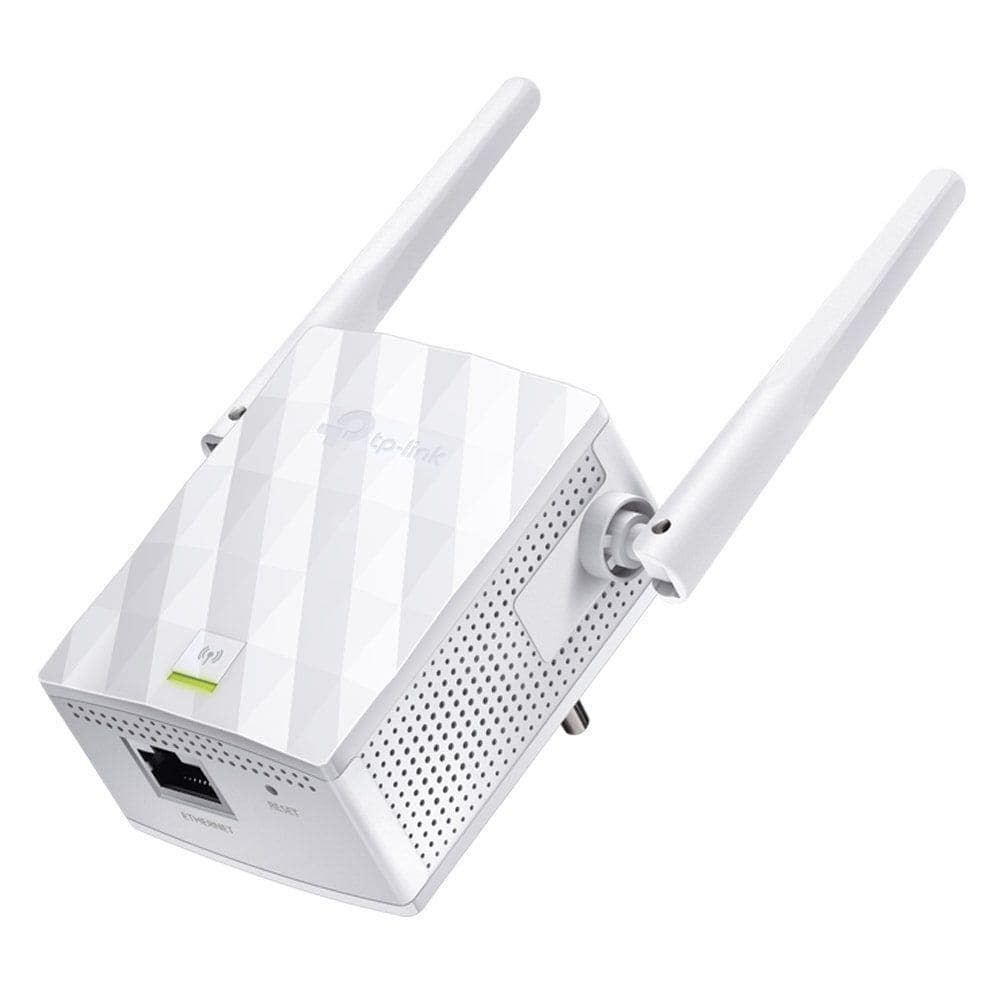 2× EXTERNAL ANTENNAS
 ETHERNET CONNECTIVITY
Bring wireless coverage into hard-to-reach areas.
Extend your router's existing 2.4 GHz Wi-Fi.
TL-WA855RE receives your existing wireless signal and retransmits it into areas where Wi-Fi coverage is weak or unavailable. It works with compatible Wi-Fi routers and gateways using the 2.4 GHz band.
Up to 300 Mbps wireless speed on 2.4 GHz.
Wireless N connectivity for everyday devices.
TL-WA855RE supports IEEE 802.11b/g/n on the 2.4 GHz frequency band with theoretical wireless signal rates of up to 300 Mbps.
Two adjustable antennas help provide reliable coverage.
Improved signal distribution with MIMO technology.
The two external antennas work with MIMO technology to help provide stable wireless coverage and maintain connectivity in extended areas.
Expand your network with a simple button press.
Find a better location for the extender.
Use the LED to help choose an effective position.
The intelligent signal indicator provides visual feedback about the extender's connection to your main router, helping you identify a more suitable installation point.
Turn a wired Ethernet connection into Wi-Fi.
Connect an Ethernet-enabled device to your Wi-Fi network.
Add wired connectivity where you need it.
The built-in 10/100 Mbps Ethernet port can connect a wired device such as a desktop, television or game console to the extended wireless network. The same Ethernet interface is used when operating the TL-WA855RE in Access Point Mode.
Choose Range Extender or Access Point operation.
Repeat your existing Wi-Fi signal into areas with weak coverage.
Convert a wired Ethernet network into a 2.4 GHz wireless network.
Adjust the extender's wireless coverage level.
Choose when the extender should be active.
Create a timetable for extender operation.
Power Schedule allows you to define when the TL-WA855RE should turn its wireless network on or off, helping reduce unnecessary operation.
Control which devices can use the extended network.
Permit selected devices to access the extender.
Restrict unwanted devices from using the network.
Manage compatible settings with TP-Link Tether.
Convenient monitoring from your smartphone.
TP-Link Tether can be used with supported firmware to monitor and manage the range extender from compatible iOS and Android devices. Web-based configuration is also available.
Wireless expansion without a separate power adapter.
Simple setup with the essentials included.
TP-Link TL-WA855RE U.S. technical details.
WIRELESS
- Wireless Standard
- IEEE 802.11b/g/n
- Frequency
- 2.4 GHz
- Maximum Signal Rate
- 300 Mbps
- Wireless Type
- Single-Band
WORKING MODES
- Range Extender Mode
- Supported
- Access Point Mode
- Supported
HARDWARE
- Ethernet Port
- 1× 10/100 Mbps RJ45
- Antennas
- 2× External
- Buttons
- WPS + Reset
- Plug Type
- US
- Input Power
- 100–240V, 50/60Hz
WIRELESS FEATURES
- MAC Address Filtering
- Supported
- Domain Login
- Supported
- Transmit Power Control
- Supported
- Power Schedule
- Supported
- LED Control
- Supported
SECURITY
- WEP
- 64 / 128 / 152-bit
- WPA-PSK
- Supported
- WPA2-PSK
- Supported
MANAGEMENT
- Web Management
- HTTP / HTTPS
- TP-Link Tether
- Supported*
- DHCP Server
- Supported
- Access Control
- Supported
PHYSICAL
- Dimensions
- 80 × 77.8 × 77.3 mm
- Maximum Power Consumption
- 3.6 W
- Operating Temperature
- 0°C – 40°C
- Operating Humidity
- 10% – 90%
- Certification
- FCC
PACKAGE
- TL-WA855RE
- 1
- Quick Installation Guide
- Included
TL-WA855RE
300Mbps Wi-Fi Range Extender
Extend the reach of your existing home Wi-Fi with the TP-Link TL-WA855RE. The compact wall-plug range extender delivers theoretical wireless speeds of up to 300 Mbps on 2.4 GHz and uses two adjustable external antennas with MIMO technology to help provide a more stable wireless connection in areas your router struggles to reach. An intelligent signal indicator helps identify a suitable placement, while the built-in Ethernet port allows wired connectivity and enables Access Point Mode.
TL-WA855RE · N300
10/100 ETHERNET · RESET
2× EXTERNAL ANTENNAS
ETHERNET CONNECTIVITY
Bring wireless coverage into hard-to-reach areas.
Extend your router's existing 2.4 GHz Wi-Fi.
TL-WA855RE receives your existing wireless signal and retransmits it into areas where Wi-Fi coverage is weak or unavailable. It works with compatible Wi-Fi routers and gateways using the 2.4 GHz band.
Up to 300 Mbps wireless speed on 2.4 GHz.
Wireless N connectivity for everyday devices.
TL-WA855RE supports IEEE 802.11b/g/n on the 2.4 GHz frequency band with theoretical wireless signal rates of up to 300 Mbps.
Two adjustable antennas help provide reliable coverage.
Improved signal distribution with MIMO technology.
The two external antennas work with MIMO technology to help provide stable wireless coverage and maintain connectivity in extended areas.
Expand your network with a simple button press.
Find a better location for the extender.
Use the LED to help choose an effective position.
The intelligent signal indicator provides visual feedback about the extender's connection to your main router, helping you identify a more suitable installation point.
Turn a wired Ethernet connection into Wi-Fi.
Connect an Ethernet-enabled device to your Wi-Fi network.
Add wired connectivity where you need it.
The built-in 10/100 Mbps Ethernet port can connect a wired device such as a desktop, television or game console to the extended wireless network. The same Ethernet interface is used when operating the TL-WA855RE in Access Point Mode.
Choose Range Extender or Access Point operation.
Repeat your existing Wi-Fi signal into areas with weak coverage.
Convert a wired Ethernet network into a 2.4 GHz wireless network.
Adjust the extender's wireless coverage level.
Choose when the extender should be active.
Create a timetable for extender operation.
Power Schedule allows you to define when the TL-WA855RE should turn its wireless network on or off, helping reduce unnecessary operation.
Control which devices can use the extended network.
Permit selected devices to access the extender.
Restrict unwanted devices from using the network.
Manage compatible settings with TP-Link Tether.
Convenient monitoring from your smartphone.
TP-Link Tether can be used with supported firmware to monitor and manage the range extender from compatible iOS and Android devices. Web-based configuration is also available.
Wireless expansion without a separate power adapter.
Simple setup with the essentials included.
TP-Link TL-WA855RE U.S. technical details.
WIRELESS
- Wireless Standard
- IEEE 802.11b/g/n
- Frequency
- 2.4 GHz
- Maximum Signal Rate
- 300 Mbps
- Wireless Type
- Single-Band
WORKING MODES
- Range Extender Mode
- Supported
- Access Point Mode
- Supported
HARDWARE
- Ethernet Port
- 1× 10/100 Mbps RJ45
- Antennas
- 2× External
- Buttons
- WPS + Reset
- Plug Type
- US
- Input Power
- 100–240V, 50/60Hz
WIRELESS FEATURES
- MAC Address Filtering
- Supported
- Domain Login
- Supported
- Transmit Power Control
- Supported
- Power Schedule
- Supported
- LED Control
- Supported
SECURITY
- WEP
- 64 / 128 / 152-bit
- WPA-PSK
- Supported
- WPA2-PSK
- Supported
MANAGEMENT
- Web Management
- HTTP / HTTPS
- TP-Link Tether
- Supported*
- DHCP Server
- Supported
- Access Control
- Supported
PHYSICAL
- Dimensions
- 80 × 77.8 × 77.3 mm
- Maximum Power Consumption
- 3.6 W
- Operating Temperature
- 0°C – 40°C
- Operating Humidity
- 10% – 90%
- Certification
- FCC
PACKAGE
- TL-WA855RE
- 1
- Quick Installation Guide
- Included